
LWC Lifecycle Hooks Explained (The Easiest Way You'll Remember Them)
Preparing for a Salesforce Developer interview?
One of the most commonly asked topics is Lightning Web Components (LWC) Lifecycle Hooks.
Many students try to memorize each hook separately, but interviews test your understanding—not your memory.
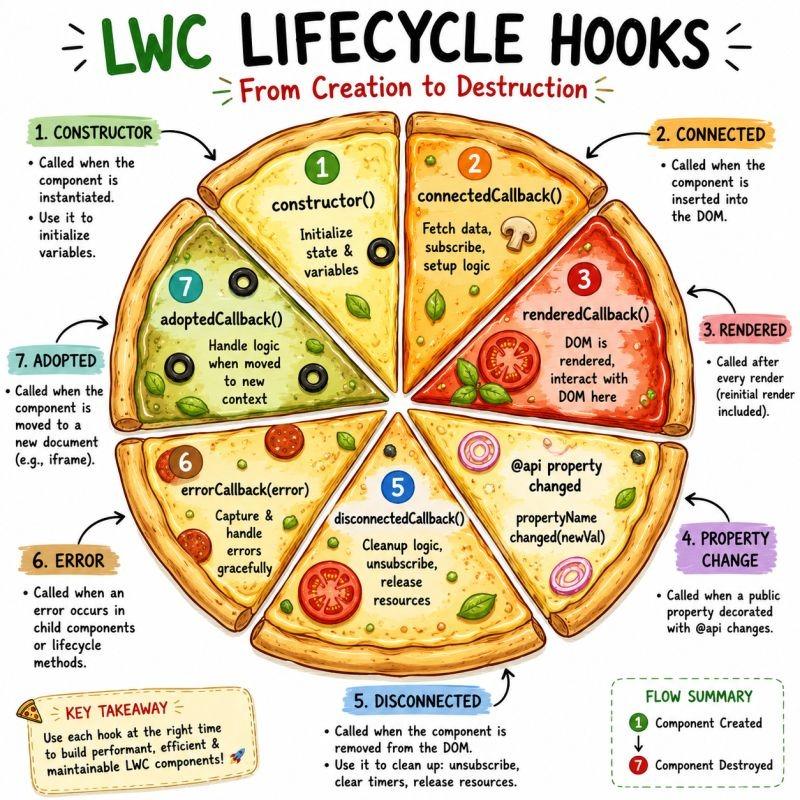
The easiest way to remember them is by imagining a pizza.
Every slice has its own purpose, and together they create a complete Lightning Web Component.
What Are Lifecycle Hooks in LWC?
Lifecycle hooks are special JavaScript methods that Salesforce automatically calls during different stages of a Lightning Web Component's life.
These hooks help developers perform actions like:
- Loading data
- Rendering UI
- Updating components
- Cleaning resources
- Handling errors
Understanding these hooks helps you write cleaner, faster, and more efficient Salesforce applications.
Complete LWC Lifecycle Flow
1. constructor()
This is the first method that executes.
Use it to:
- Initialize variables
- Setup default values
- Call super()
Avoid:
- Fetching Apex data
- Manipulating DOM
Example:
constructor() {
   super();
   this.title = 'Velocity Salesforce';
}
2. connectedCallback()
Runs when the component is inserted into the DOM.
Perfect for:
- Calling Apex
- Fetching records
- Loading configuration
- Registering events
- Initial API calls
Example:
connectedCallback() {
   this.loadAccounts();
}
3. renderedCallback()
Runs every time the UI finishes rendering.
Use for:
- DOM manipulation
- Third-party JavaScript libraries
- Calculating element sizes
Avoid:
Updating tracked properties directly here because it can create infinite rendering loops.
Example:
renderedCallback() {
   if(this.initialized) return;
   this.initialized = true;
}
4. @api Property Changes
Whenever a parent component sends a new value to a child component, Salesforce updates the @api property.
Best practice:
Use getters and setters.
Example:
@api
set recordId(value){
   this._recordId = value;
   this.loadRecord();
}
5. disconnectedCallback()
Runs before the component is removed.
Use it for cleanup:
- Remove event listeners
- Stop timers
- Unsubscribe from message channels
- Clear intervals
Example:
disconnectedCallback(){
   clearInterval(this.timer);
}
6. errorCallback(error, stack)
Captures errors coming from child components.
Useful for:
- Logging
- Showing friendly error messages
- Monitoring production issues
Example:
errorCallback(error, stack){
   console.error(error);
}
Easy Way to Remember
Think about building a pizza.
🍕 Create → constructor()
🍕 Connect → connectedCallback()
🍕 Bake & Serve → renderedCallback()
🍕 Add Extra Toppings → @api Updates
🍕 Finish & Clean Table → disconnectedCallback()
🍕 Handle Mistakes → errorCallback()
This sequence makes lifecycle hooks much easier to remember during interviews.
Common Salesforce Interview Questions
What is the difference between constructor() and connectedCallback()?
Constructor initializes the object, while connectedCallback executes after the component is added to the DOM.
Where should Apex methods be called?
Most Apex calls should be placed inside connectedCallback().
Why should you avoid updating tracked properties inside renderedCallback()?
Because every update triggers another render, leading to an infinite rendering loop.
Which lifecycle hook is used for cleanup?
disconnectedCallback()
Which hook catches child component errors?
errorCallback()
Best Practices
✔ Use constructor only for initialization.
✔ Fetch server data inside connectedCallback.
✔ Use renderedCallback only when DOM access is necessary.
✔ Always clean timers and listeners.
✔ Keep lifecycle hooks lightweight for better performance.
✔ Handle errors gracefully using errorCallback.
Real Interview Tip
Most interviewers do not ask:
"List all lifecycle hooks."
Instead, they ask scenario-based questions like:
- When should Apex be called?
- Which hook accesses the DOM?
- How do you clean event listeners?
- Why shouldn't tracked properties be updated inside renderedCallback()?
Understanding the complete lifecycle flow helps you confidently answer these questions.
Why Learn Salesforce at Velocity Corporate Training Center Pune?
Our Salesforce Developer Program includes:
- Salesforce Administration
- Apex Programming
- Lightning Web Components (LWC)
- SOQL & SOSL
- Triggers
- Batch Apex
- Integration APIs
- Real-Time Projects
- Interview Preparation
- Resume Building
- Mock Interviews
- Placement Assistance
Students gain practical experience through industry-oriented projects and interview-focused training.
Final Thoughts
Learning LWC lifecycle hooks is essential for every Salesforce Developer. Instead of memorizing methods, understand why each hook exists and when it should be used. This practical approach will help you build better applications and perform confidently in Salesforce interviews.
Start practicing with real components, experiment with each lifecycle hook, and you'll quickly become comfortable developing modern Lightning Web Components.
SEO Meta Title
LWC Lifecycle Hooks Explained with Examples | Salesforce Interview Guide 2026
(59 characters)
SEO Meta Description
Learn LWC Lifecycle Hooks in Salesforce with examples, interview questions, best practices, and real-world scenarios. Master constructor(), connectedCallback(), renderedCallback(), errorCallback(), and more.
(157 characters)
Focus Keywords
- LWC Lifecycle Hooks
- Lightning Web Components
- Salesforce LWC Tutorial
- Salesforce Interview Questions
- Salesforce Developer Guide
- connectedCallback
- renderedCallback
- constructor in LWC
- errorCallback
- Salesforce Apex
- Salesforce Training Pune
- Salesforce Classes Pune
- Salesforce Developer Course
- LWC Interview Questions
- Salesforce Lightning Components